How to Create an IT Resume as a Fresher – A Step-by-Step Guide
Published: 30 Oct, 2026 | Author: CCI Admin | Category: Career / IT Skills
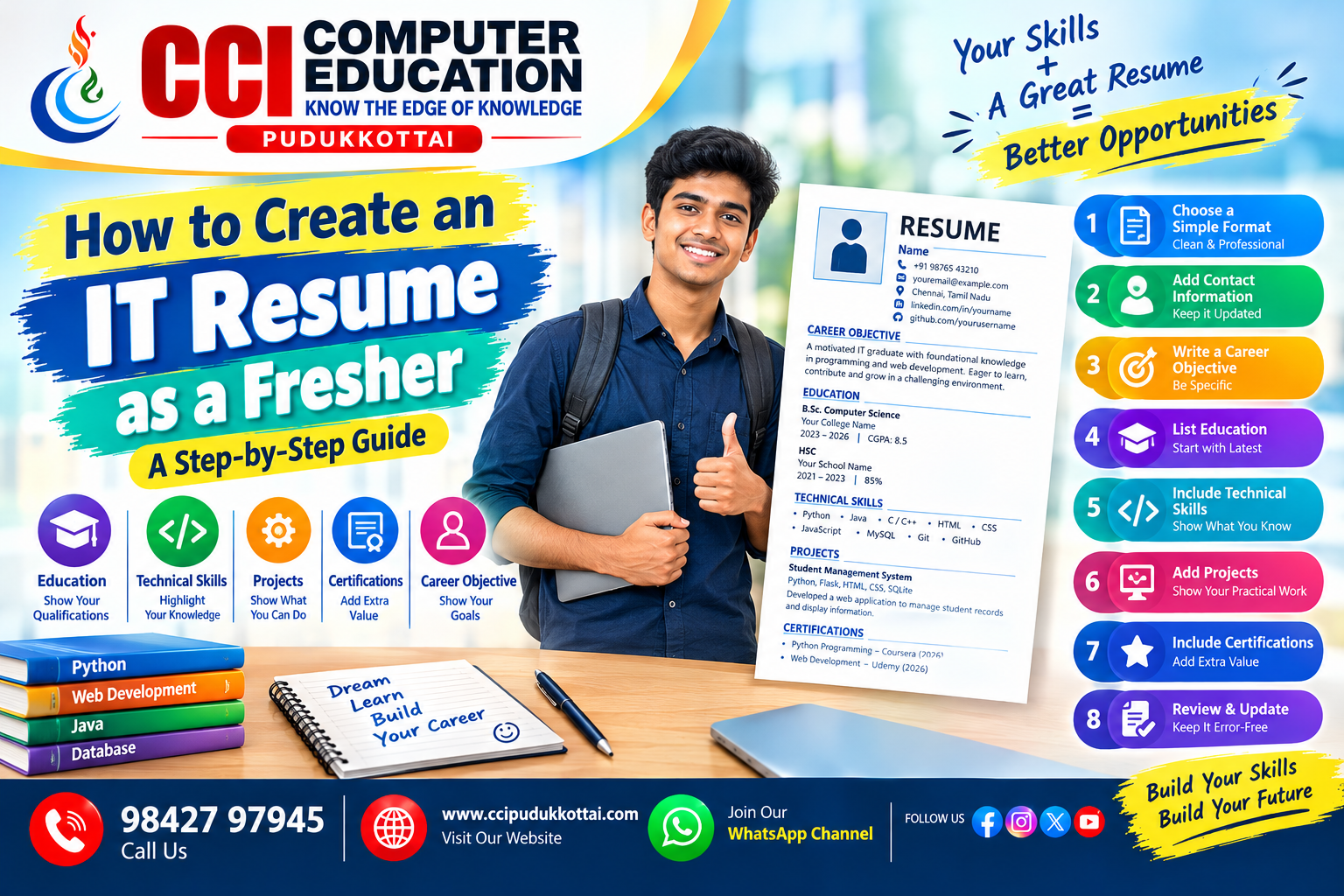
Creating your first IT resume can feel challenging when you have no professional work experience. However, freshers can build a strong resume by highlighting their education, technical skills, academic projects, certifications, and willingness to learn.
In this blog, we will learn how to prepare a clear and professional IT resume that helps recruiters understand your skills and potential.
1. What Is an IT Resume?
An IT resume is a document that introduces your education, technical knowledge, projects, skills, and relevant experience to an employer. For freshers, it should focus on what you have learned and what you can demonstrate through practical work.
2. Choose a Simple Resume Format
- Use a clean and professional layout.
- Choose readable fonts such as Arial or Calibri.
- Use clear section headings and bullet points.
- Keep the resume concise, usually one page for a fresher.
- Save it as a PDF unless the employer requests another format.
3. Add Your Contact Information
Place your contact details at the top of your resume.
YOUR FULL NAME
Phone: +91 XXXXX XXXXX
Email: yourname@example.com
Location: Your City, State
LinkedIn: linkedin.com/in/your-profile
GitHub: github.com/your-username
Use a professional email address and include updated LinkedIn or GitHub links if available.
4. Write a Career Objective
A career objective briefly explains your career interests and relevant skills.
Example: IT Fresher
A motivated IT graduate with foundational knowledge of
Python, Java, HTML, CSS, and SQL. Interested in starting
a career in software development, applying technical
skills to practical projects, and continuously learning
new technologies.
Customise this objective according to the job role you are applying for.
5. Mention Your Educational Qualification
List your latest qualification first.
| Qualification | Institution | Year | Result |
|---|---|---|---|
| B.Sc. Computer Science | Your College | 2026 | Your CGPA |
| HSC | Your School | 2023 | Your Percentage |
Note: Replace these sample details with your actual educational information.
6. Highlight Your Technical Skills
Include only skills you have actually learned and can explain during an interview.
- Programming: Python, Java, C, C++
- Web Development: HTML, CSS, JavaScript
- Database: MySQL, SQL
- Tools: Visual Studio Code, Git, GitHub
- Professional Skills: Communication, teamwork, problem-solving
7. Add Academic and Personal Projects
Projects are important for freshers because they demonstrate practical knowledge.
Example: Student Management System
- Technologies: Python, Flask, HTML, CSS, SQLite
- Description: Developed a web application to manage student records and display student information.
- Contribution: Created the user interface and implemented selected application features.
Describe your own contribution accurately. Add a GitHub repository or live demo link if available.
8. Include Certifications and Training
Mention relevant certifications, workshops, internships, and training programmes. Include the course name, provider, and completion year.
9. Add Achievements and Activities
You can include coding competitions, hackathons, technical events, college presentations, and volunteering activities that demonstrate your interests and initiative.
10. Important Resume Tips for IT Freshers
- Customise your resume for the job description.
- Use relevant keywords that match your actual skills.
- Check spelling, grammar, and contact details.
- Keep the design simple and professional.
- Never add fake experience or certifications.
- Describe your projects clearly.
- Use a professional file name such as YourName_IT_Resume.pdf.
11. IT Fresher Resume Checklist
| Section | What to Check |
|---|---|
| Contact Details | Phone, email, location |
| Career Objective | Short and relevant |
| Education | Course, institution, year |
| Technical Skills | Skills you can demonstrate |
| Projects | Tools, description, contribution |
| Certifications | Completed relevant courses |
| Final Review | Correct details and readable layout |
12. Frequently Asked Questions
Q1. Can I create an IT resume without work experience?
Yes. Freshers can highlight education, technical skills, academic projects, certifications, and practical training.
Q2. How many pages should a fresher resume have?
A one-page resume is usually a good choice for freshers.
Q3. Should I include projects in my resume?
Yes. Projects help recruiters understand how you apply your technical knowledge.
Q4. Should I add a photo to my IT resume?
A photo is usually not necessary unless the employer specifically requests one.
Q5. Which file format should I use?
PDF is commonly suitable because it preserves the document formatting. Follow the employer's instructions if another format is requested.
Q6. What technical skills should an IT fresher mention?
Mention relevant programming, web development, database, and development-tool skills that you can explain and demonstrate.
Conclusion
A good IT resume for a fresher does not depend on work experience alone. It should clearly present your education, technical skills, projects, and learning achievements.
Start preparing your resume today, improve your technical skills, and build projects that demonstrate what you can do!
Related CCI Blogs
- How to Stay Consistent While Learning to Code – Simple Tips for Students
- How College Students Can Build a Strong Resume Before Graduation
- 10 Coding Tips for Beginners to Build a Successful IT Career
Build Your IT Skills with CCI Computer Education
CCI Computer Education, Pudukkottai encourages students to develop practical computer knowledge, programming skills, and project experience for future career opportunities.
Contact CCI Computer Education – Pudukkottai
Call: 98427 97945
Website:
ccipudukkottai.com
WhatsApp Channel:
Join CCI Computer Education
CCI Computer Education – Learn Today, Build Tomorrow.