Student Frontend Project: Food Menu and Online Ordering System Using HTML, CSS and JavaScript
Published: 28 Oct, 2026 | Author: CCI Admin | Category: Web Development / Student Projects
Practical projects help students understand how programming concepts work in real-world applications. As part of frontend web development practice, a CCI Computer Education student developed a food menu and online ordering website using HTML, CSS, and JavaScript.
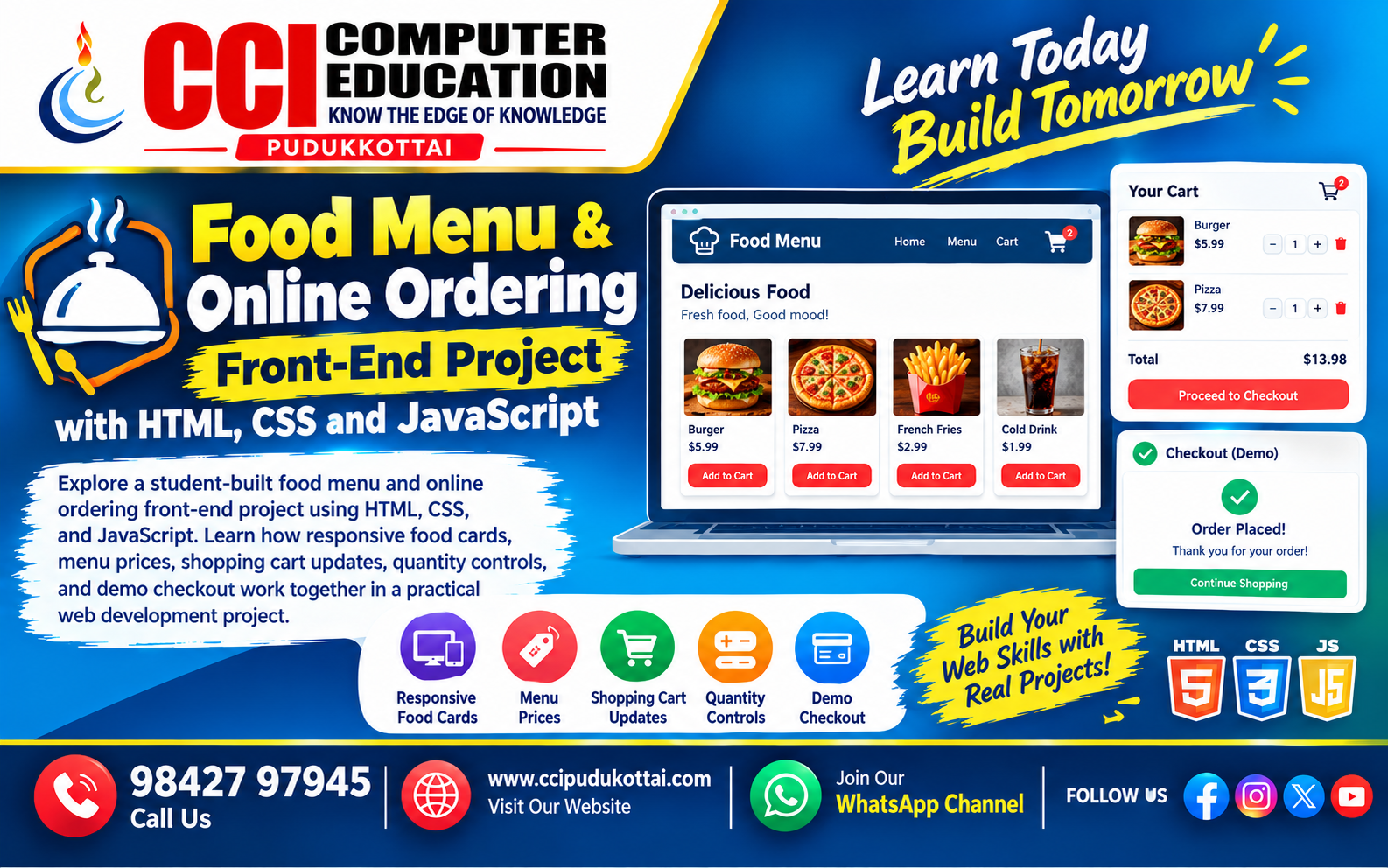
The project, titled Foodie – Online Food Order, presents a digital food menu where users can browse food items, view prices, add products to a shopping cart, change quantities, remove items, and view the total amount before trying a demo checkout.
1. Project Overview
The main goal of this project is to demonstrate how a restaurant or college canteen can display its menu through a simple, interactive website.
- Display food items with images and prices.
- Organize menu items into responsive food cards.
- Allow users to add food items to the cart.
- Increase or decrease item quantities.
- Remove products from the cart.
- Calculate the total amount dynamically.
- Display a demonstration checkout message.
2. Technologies Used
| Technology | Purpose |
|---|---|
| HTML5 | Creates the webpage structure, navigation, food cards, menu, cart, and footer. |
| CSS3 | Adds colors, spacing, layouts, buttons, shadows, and responsive styling. |
| JavaScript | Handles cart operations, quantity changes, item removal, and total calculation. |
3. Website Design and User Interface
The website uses a bright orange and white theme to create a food-related visual experience. Its main sections include:
Header and Navigation
The header displays the college canteen name, navigation links, and a cart counter. Users can navigate to the home section, food menu, and cart.
Food Menu Section
Food items are displayed using individual cards. Each card includes an image, food name, price, and an Add to Cart button. The sample menu includes burgers, pizza, fried rice, biryani, dosa, idli, beverages, and other dishes.
Shopping Cart Section
The cart displays selected items, their prices, quantities, item totals, and the overall order amount. Users can increase or decrease quantities or remove items.
4. Responsive Design Using CSS Grid
The project uses CSS Grid to arrange food cards based on the available screen width. The auto-fit and minmax() functions help create flexible columns.
.food-container {
    display: grid;
    grid-template-columns:
        repeat(auto-fit, minmax(220px, 1fr));
    gap: 25px;
}
This layout allows food cards to adjust to different screen sizes instead of relying on a fixed number of columns.
The project also uses a media query for screens up to 500 pixels wide to adjust the header alignment, heading size, and cart item layout.
5. Adding Food Items to the Cart Using JavaScript
The JavaScript code stores selected food items in an array. When a user adds an item, the program checks whether that item is already in the cart. If it exists, its quantity increases; otherwise, a new item is added.
let cart = [];

function addToCart(name, price) {
    let item = cart.find(food => food.name === name);

    if (item) {
        item.quantity++;
    } else {
        cart.push({
            name: name,
            price: price,
            quantity: 1
        });
    }

    displayCart();
}
How It Works
- The user clicks the Add to Cart button.
- JavaScript searches the cart for the selected food item.
- The quantity increases if the item already exists.
- Otherwise, a new cart item is created.
- The display function refreshes the cart and total.
Project Presentation
Want to explore the complete project presentation? Click the button below to view the Food Ordering System presentation.
6. Updating Quantities and Removing Items
The project includes functions to update quantities and remove selected items.
function changeQuantity(name, amount) {
    let item = cart.find(food => food.name === name);

    if (item) {
        item.quantity += amount;

        if (item.quantity <= 0) {
            cart = cart.filter(food => food.name !== name);
        }
    }

    displayCart();
}

function removeItem(name) {
    cart = cart.filter(food => food.name !== name);
    displayCart();
}
When the quantity reaches zero, the item is removed from the cart. The Remove button also allows users to delete an item directly.
7. Calculating the Total Amount
The website calculates each item's subtotal by multiplying its price by its quantity. These subtotals are added together to produce the final cart total.
let itemTotal = food.price * food.quantity;

total += itemTotal;
count += food.quantity;
For example, if a customer selects two burgers priced at ₹149 each, the subtotal is ₹298. The cart updates the quantity count and total amount as the user changes the selection.
8. Demo Checkout Function
The project contains a checkout function that checks whether the cart is empty. If items have been selected, it calculates the total and displays an order summary using a browser alert.
function checkout() {
    if (cart.length === 0) {
        alert("Your cart is empty! Please add food first.");
        return;
    }

    let total = cart.reduce(
        (sum, food) => sum + food.price * food.quantity,
        0
    );

    alert("Order Summary\nTotal Amount: ₹" + total +
          "\nThis is a demo checkout.");
}
Project limitation: This is a frontend demonstration. The supplied code does not show a backend, database, payment gateway, or actual order submission. A real food-ordering application would need additional development for those features.
9. Skills Demonstrated in This Student Project
| Skill | Practical Application |
|---|---|
| HTML | Building webpage sections and food cards. |
| CSS | Styling layouts, buttons, and responsive grids. |
| JavaScript arrays | Storing and managing selected food items. |
| Functions | Adding, updating, displaying, and removing cart items. |
| DOM manipulation | Updating cart details and totals on the webpage. |
| Responsive design | Adapting the interface to different screen widths. |
10. Future Enhancements
The student can extend this project into a more complete food-ordering application by adding the following features:
- Food category filters and a search option.
- Customer registration and login.
- A backend using Python Flask, PHP, Java, or another suitable technology.
- Database storage for menu items, customers, and orders.
- Order confirmation and order history.
- Secure payment integration through a suitable payment provider.
- An admin dashboard to manage menu items and prices.
11. Faculty Tip
At CCI Computer Education, project-based learning helps students connect programming concepts with practical applications. A food menu project is a useful exercise for practising HTML structure, CSS layouts, JavaScript functions, arrays, event handling, and DOM manipulation.
Students should test their websites on mobile and desktop screens, check that all buttons work correctly, and explain how the cart total is calculated. They can then build on the same project by connecting it to a database and backend.
12. Frequently Asked Questions (FAQs)
1. Which technologies are used in this food menu project?
The submitted project uses HTML, CSS, and JavaScript to build and operate the frontend interface.
2. Can customers add multiple food items?
Yes. Users can add different items, increase quantities, and view the updated cart total.
3. Is the project responsive?
The CSS includes a flexible grid layout and a media query for smaller screens. Testing on different devices is still recommended.
4. Does this project save orders in a database?
No database integration is shown in the supplied code. The cart is stored in a JavaScript array while the page is running.
5. Does the checkout process accept online payments?
No. The current checkout only displays a demonstration order summary through a browser alert.
6. What can students learn from this project?
Students can practise webpage structure, responsive styling, arrays, functions, DOM manipulation, event handling, and dynamic calculations.
Conclusion
The Foodie food menu and online ordering website is a practical example of frontend web development using HTML, CSS, and JavaScript. It demonstrates how a menu interface, product cards, shopping cart, quantity controls, and total calculation can work together in a single webpage.
With further improvements, this student project can become the foundation for a complete restaurant or college canteen ordering application.
At CCI Computer Education, we encourage students to learn by building practical projects and applying their programming knowledge.
Related CCI Blogs
- HTML Basics for Beginners
- CSS Styling and Responsive Web Design
- JavaScript DOM Manipulation for Beginners
Learn Web Development with CCI Computer Education
Want to develop your programming skills through practical projects? CCI Computer Education helps learners strengthen their technical knowledge through hands-on programming and web development practice. 👆Click Here
Contact CCI Computer Education – Pudukkottai
Call: 98427 97945
Website:
www.ccipudukkottai.com
WhatsApp Channel: Join CCI Computer Education
CCI Computer Education – Learn Today, Build Tomorrow.